Cavruqen
Flux Guide
Flux Guide
Couldn't load pickup availability
1. Problem Statement
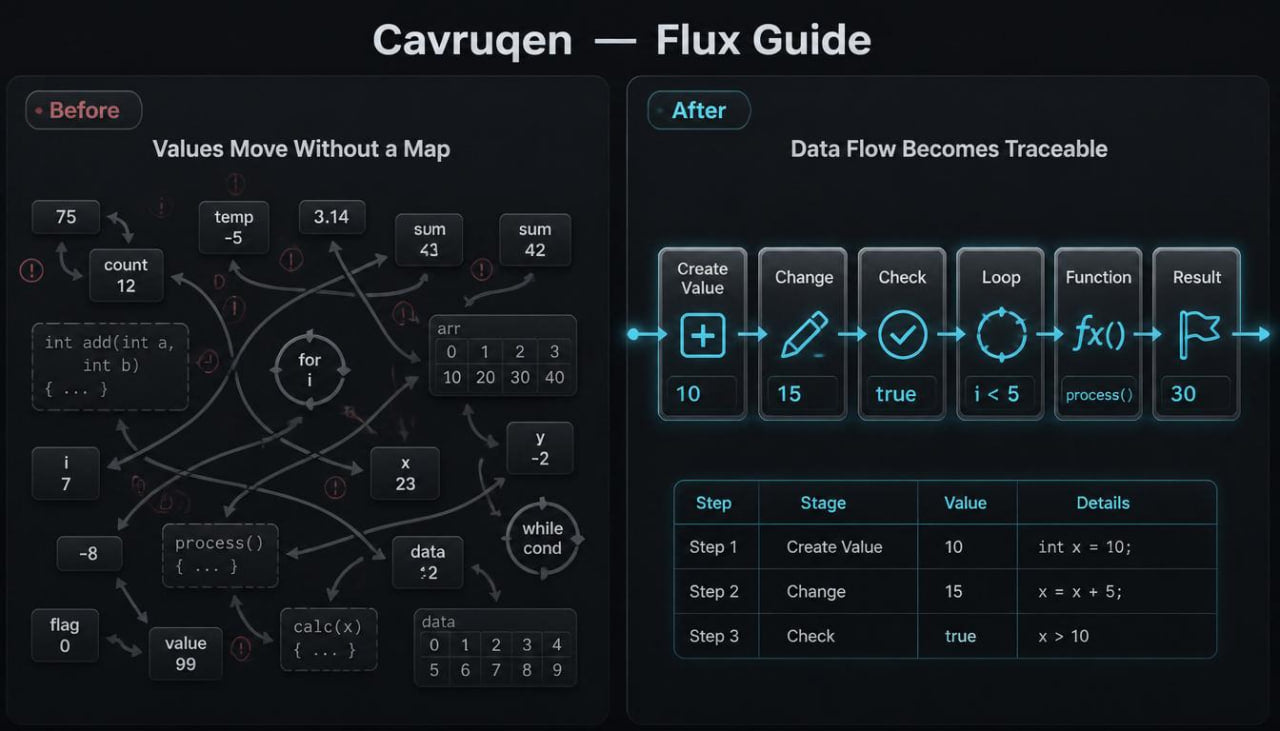
At the middle stage of learning C++, a learner often sees that code no longer consists of only a few separate lines. Values can change while an example runs, move into functions, take part in loops, or be stored in data groups. Because of this, it becomes harder to track what happens at each step. A learner may know the syntax of separate constructions, but still feel unsure when asked to explain the movement of values in a short fragment. Flux Guide is created to help review this movement calmly and make work with code more orderly.
2. Solution
Flux Guide presents C++ through the idea of data flow: where a value comes from, where it is stored, how it changes, and where it is used later. Each module shows not only a language construction, but also its role in the general logic of an example. The materials help the learner read code with closer attention: from the first value to an intermediate change, from a condition to repetition, from a function to final output. The tier gives plenty of space to breakdowns, schemes, short tasks, and exercises for explanation. Flux Guide fits learners who already know the basic topics and want to better see the link between data and actions in code.
3. What’s Inside
Flux Guide contains a detailed learning set built around the movement of values in C++ examples. If Frame Course helps gather topics into a learning frame, Flux Guide focuses on how information moves through different parts of code. The learner does not only read lines, but also learns to ask questions: which value is created here, where it changes, which condition checks it, which loop uses it again, which function receives it, and what happens after that.
The first block of Flux Guide is dedicated to reviewing variables, values, and expressions, but with attention to movement. The materials show that a variable is not a static mark on a page. It can receive a starting value, change after a calculation, be used in a condition, or move into a function. In this block, the learner works with examples where a value needs to be traced line by line. After each example, there is an explanation: what the value was at the start, what changed it, where it was used, and what result appeared inside the learning fragment.
The second block looks at conditions as choice points in code flow. The learner sees how values affect which block will run. The materials can include examples with number checks, string comparison, several conditional options, and small logical links. An important part of this block is learning not only to see if and else, but to understand which value is checked and why the code moves to a certain branch. Tasks can ask the learner to explain the execution path, change a condition, add another option, or find a place where the logic became unclear.
The third block is dedicated to loops as repeated movement. Here, the learner studies how a value changes during each repetition. The materials explain the role of the counter, starting point, ending condition, and action inside the loop. Examples can show counting a sum, changing a value at each step, going through a group of numbers, or forming a final value gradually. After each example, a table or short scheme shows what happens on the first, second, third, and later steps. This format helps the learner trace repetition logic with attention instead of guessing.
The fourth block introduces arrays and simple data groups. Here, the learner sees that values can be stored not only one by one, but also in an ordered group. The materials explain how to read elements, how to use a position number, how to move through a group with a loop, and how to perform a small action with each element. Tasks can include finding a certain value, counting elements by condition, changing one element, or explaining which element will be used in a specific line. In this block, the material should stay calm, with short examples and step-by-step explanations instead of heavy theory.
The fifth block works with strings as learning material for analyzing characters and text values. The learner studies how text can be stored, how short fragments can be compared, how length can be checked, how a single character can be read, and how text values can be joined. The materials can include exercises for changing a message, analyzing characters, simple output formatting, and reading text variables in a short example. This block adds variety because the learner works not only with numbers, but also with text data.
The sixth block is dedicated to functions and passing values. Here, a function is seen not only as a separate part of code, but as a place where a value enters, is processed, and returns to another part of the example. The learner sees how parameters receive data, how the function body performs an action, and how the returned result can be used in later code. Examples can include a function for calculation, checking, creating a message, or processing one element from a group. Tasks can ask the learner to explain the path of a value from a function call to the returned result.
The seventh block of Flux Guide contains data-flow schemes. These can be small visual or text schemes: “value created → value checked → value changed → value displayed.” Such schemes help the learner see not only lines of code, but also the route of information. Each example can include a short map: which variables take part, where they change, which conditions check them, and where the final value appears.
The eighth block contains practical tracing tasks. The learner receives a short code fragment and then fills in a table of values after each step. For example: what value a variable has after the first line, after a condition, after one loop pass, after a function call. These exercises help develop attentive reading and reduce confusion in longer examples.
The ninth block is dedicated to editing logic. The learner receives examples where code is almost correct, but has an unclear order, an extra action, or a misplaced check. The task is not only to find a symbol, but to understand why data is moving along the wrong path. After each task, there is an explanation of how the edited structure changes the behavior of the example.
The final part of Flux Guide is a closing section with several learning tasks. They combine variables, conditions, loops, arrays, strings, and functions. Each task has a short description, hints for analysis, space for independent work, and a breakdown of the logic. The aim of this section is to help the learner see C++ not as a group of separate topics, but as a system of values, actions, and checks working together.
4. Who is this for?
Flux Guide is for learners who already know the basic C++ structure, variables, conditions, loops, and functions. This tier is for those who want to better understand how values move through code and how different parts of an example affect one another. It can be useful after Frame Course, when the learner has already learned to see the general task frame, but wants to work in greater detail with inner logic.
This tier also fits learners who often feel lost in examples where a variable changes several times or is used in different code parts. Flux Guide helps the learner avoid rushing and review each action through questions: what happened before this line, what changed after it, and where this value will be used next.
The materials are created for independent study, review, and careful analysis. If a learner likes schemes, tables, examples with explanations, and tracing exercises, this tier can be a convenient stage in the Cavruqen line.
5. What You’ll Learn
- How to trace a variable value line by line.
- How to see data movement in a short C++ example.
- How conditions affect the execution path of code.
- How values change inside a loop.
- How to use a step table for repetition analysis.
- How to read arrays and simple data groups.
- How to work with an element position in a group.
- How to perform basic analysis of string values.
- How to read a function through input data, action, and result.
- How to trace a value from a function call to return.
- How to build short data-flow schemes.
- How to complete code tracing exercises.
- How to find unclear logic in learning examples.
- How to combine variables, conditions, loops, arrays, strings, and functions.
- How to explain the inner logic of an example in your own words.
6. Store Terms
Flux Guide is a paid Cavruqen learning tier. The page can mention a 30-day request window related to payment matters according to the store policy.
Self-paced learning overview
- 📁 Digital file available after purchase
- 🧭 Long-term availability
- 🔒 Secure checkout
- 📅 Content updated in 2026
What format are the materials provided in?
What format are the materials provided in?
The materials are provided as structured learning files, modules, examples, short explanations, and practical tasks. Each tier has its own amount of content, but the general structure stays the same: topic introduction, example, task, and review.
Do I need previous C++ knowledge before starting?
Do I need previous C++ knowledge before starting?
For the starting tiers, previous preparation is not required. They are created for learning basic ideas, syntax, code structure, and simple examples. Higher tiers may include more topics, exercises, and explanations for learners who already know the basics.
Can I request a refund after purchasing a paid tier?
Can I request a refund after purchasing a paid tier?
Paid tiers may include a 30-day refund request period according to the store policy. Since the first tier is free, no payment is required for it, so this point can be presented as information for future paid materials.
Share